Skip to content
The Comm Spot The Comm Spot

It's All About Communication

  • HOME
  • ABOUT
    • Meet the Creator: Curtis Newbold, PhD
    • Hire Curtis
    • Publish with Us
    • Contact
    • Privacy Notice
  • COMM-BASICS
    • Glossary
    • Citation & Style Guides
      • AP Style (Journalism)
        • AP Style Overview
        • AP Style Guidelines
        • Media Ethics – SPJ Code of Ethics
        • Elements of Newsworthiness
      • APA Style
        • APA Format – Overview
        • APA - References Guidelines
        • APA - In-text Citations
        • APA - Citing Authors
        • APA - Audiovisual Media
        • APA - Books
        • APA - Digital Sources
        • APA - Events & Interactions
        • APA - Periodicals
        • APA - Print Sources (other than books)
      • Chicago Style
        • Chicago – Overview
        • Chicago - Author-Date System
        • Chicago - Notes-Bibliography System
        • Chicago - In-text Citations
        • Chicago Style - Citing Authors
        • Chicago - Audiovisual Media
        • Chicago - Books
        • Chicago - Digital Sources
        • Chicago - Events and Interactions
        • Chicago - Citing Periodicals
        • Chicago - Print Sources (other than books)
      • MLA Style
        • MLA Overview
        • MLA Works Cited Pages
        • MLA In-text Citations
        • MLA – Authors
        • MLA – Audiovisual Media
        • MLA – Books
        • MLA – Digital Sources
        • MLA – Events & Interactions
        • MLA – Periodicals
        • MLA – Print Sources (other than books)
    • Rhetoric
      • Overview of Rhetoric
      • Rhetorical Appeals (Rhetorical Triangle)
      • Branches of Oratory
      • Canons of Rhetoric
      • Rhetorical Devices
      • Kairos
      • Topos
      • Key Figures in Rhetoric
    • Research Methods
      • Case Studies
      • Competitor Analysis
      • Content Analysis
      • Discourse Analysis
      • Ethnography
      • Focus Groups
      • Observation Research
      • S.W.O.T. Analysis
      • Secondary Research
      • Surveys
      • Target Market Analysis
      • Usability Testing
      • Visual Analysis
    • Theories
    • Thinkers
  • COMM-SUBJECTS
    • Interpersonal Communication
      • Active Listening
      • Body Language
      • Conflict Management
      • Emotional Intelligence
        • Emotional Intelligence Overview
        • Self-Awareness
        • Self-Regulation
        • Motivation
        • Empathy
        • Social Skills
        • Emotional Intelligence Resources
      • Feedback
      • Negotiation
        • Overview of Negotiation
        • Negotiation Skills
        • Negotiation Strategies & Techniques
        • Stages of Negotiation
        • Common Negotiation Scenarios
        • Negotiation Case Studies & Examples
        • Negotiation Tools & Resources
        • Negotiation FAQ
    • Journalism
    • Public Speaking
      • General Guidelines
      • Overcoming Fear
      • Speech Writing and Organization
      • Delivery Techniques
      • Body Language
      • Audience Engagement
      • Storytelling
      • Designing Slides
      • P.O.W.E.R.F.U.L. Presentation Method
    • Strategic Communication
      • Business & Org Comm
        • Definition & History
        • Org Comm Theories
        • Business Documents
        • Change Management
        • Employee Relations
        • Employment Communication
        • Group & Team Communication
        • Leadership Communication
        • Power, Identity, & Ethics at Work
        • Project Management
      • Integrated Marketing Comm
        • Definition of IMC
        • Core Principles of IMC
        • IMC Planning
        • Audience Segmentation
        • Marketing Channels
        • Message Strategies
        • Campaign Measurement & Evaluation
        • Trends & Innovations in IMC
        • Challenges & Pitfalls in IMC
        • Careers & Roles in IMC
      • Public Relations
        • Foundations in PR
        • Strategic Practice
        • Tools & Tactics
        • Research & Analysis
        • Professional Development
      • Case Studies in Strat Comm
    • Technical & Scientific Communication
    • Visual Communication
      • Data Visualization
      • Information Design
      • Photography
      • Web Design
    • Written Communication
      • Writing Process
      • Organizational Methods
        • Five Paragraph Essay
        • Hourglass Method of Writing
        • IMRaD Format (Science)
        • Indirect Method (Bad News)
        • Inverted Pyramid (Journalism)
        • Martini Glass
        • Narrative Format
        • Proposal Format
        • Rogerian Method
        • Toulmin Method
      • Plain Language
        • Audience (Plain Language)
        • Organization (Plain Language)
        • Conversation (Plain Language)
        • Simplicity (Plain Language)
        • Word Choice (Plain Language)
        • Sentence Structure (Plain Language)
        • Design (Plain Language)
      • Punctuation
        • Apostrophes
        • Brackets
        • Colons
        • Commas
        • Ellipses
        • Em Dashes
        • En Dashes
        • Exclamation Marks
        • Hyphens
        • Parentheses
        • Periods
        • Question Marks
        • Quotation Marks
        • Semicolons
      • Style
        • Clarity
        • Conciseness
        • Consistency
        • Editing
        • Flow
        • Rhetorical Devices
        • Sentence Structure
        • Storytelling
        • Tone
        • Voice
        • Word Choice
  • RESOURCES
    • Teaching Resources
      • Assignments & Activities
      • Instructional Design
      • Pedagogies
  • BLOGS
    • The Spotlight Blog
    • Comm Sparks
  • SHOP
    • Cart
    • Checkout
0
The Comm Spot
The Comm Spot

It's All About Communication

Streamgraph – Data Visualization

Home >COMM-Subjects >Visual Communication >Data Visualization >Types of Data Visualizations (Charts and Graphs) >Streamgraph – Data Visualization

Streamgraph: How to Show Flowing Composition Over Time

A streamgraph helps visualize how multiple categories change over time while emphasizing flow and movement. Use it to show composition within a whole, but with a more organic and dynamic appearance than traditional stacked area charts.

Turn to a streamgraph when the goal is to highlight patterns, rhythms, or shifting contributions across a timeline. Instead of stacking layers on a fixed baseline, streamgraphs center the layers around a flowing axis, creating a shape that feels balanced and continuous.

Streamgraphs are especially effective when storytelling matters. Their fluid design draws attention to changes in prominence, growth, and decline, making them popular in data journalism and creative analytics.


Related Charts and Graphs

Several visuals relate closely to streamgraphs and may be better choices depending on the goal.

  • Stacked area graphs show similar data but maintain a fixed baseline, making precise comparison easier.
  • Multiline charts compare trends without emphasizing cumulative totals.
  • 100% stacked area charts focus on proportion rather than absolute magnitude.
  • ThemeRiver diagrams are an early form of streamgraph often used in temporal analysis.
  • Ridgeline plots compare distributions across groups rather than layered composition.

Choosing between these options depends on whether the focus is precision, proportion, or visual storytelling.


What a Streamgraph Is

A streamgraph displays multiple time-series layers stacked around a central axis, creating a flowing shape that resembles waves or streams. Each layer represents a category, and the thickness of that layer reflects its value at a given point in time.

Common elements include:

  • A continuous time-based horizontal axis
  • Smooth, flowing layers representing categories
  • A symmetrical or centered layout
  • Color variations distinguishing streams

Unlike stacked area charts, streamgraphs minimize the visual dominance of a baseline. This makes the overall shape feel more balanced, but it can also make precise comparisons more difficult.

The visual emphasis lies in movement and pattern. Peaks and valleys form across the chart, helping viewers identify moments when categories rise, fall, or overlap.


When to Use a Streamgraph

Use a streamgraph when the goal is to communicate evolving composition with a strong visual narrative.

This visual works especially well when the goal is to:

  • Show how contributions shift over time
  • Highlight trends in cultural or media data
  • Present creative or exploratory analytics
  • Emphasize flow rather than exact values
  • Tell a story about changing prominence across categories

Streamgraphs are often chosen when aesthetic appeal supports engagement. The flowing layers can make complex datasets feel more approachable and dynamic.

However, streamgraphs work best when viewers do not need to make precise numeric comparisons between layers. Their strength lies in revealing overall movement rather than exact measurement.


Types of Data Sets That Work Best for a Streamgraph

Streamgraphs work best with time-series data that contains multiple related categories contributing to a total.

Strong candidates include:

  • Music genre popularity over time
  • Social media or topic frequency trends
  • Media consumption patterns
  • Website traffic by category
  • Cultural or linguistic trends
  • Entertainment or streaming analytics

Data should be continuous and evenly spaced across the timeline. Sudden gaps or irregular intervals can disrupt the visual flow and make interpretation more difficult.

Because streamgraphs emphasize pattern, datasets with gradual change or cyclical behavior often produce the most compelling visuals.


Real-World Examples of a Streamgraph

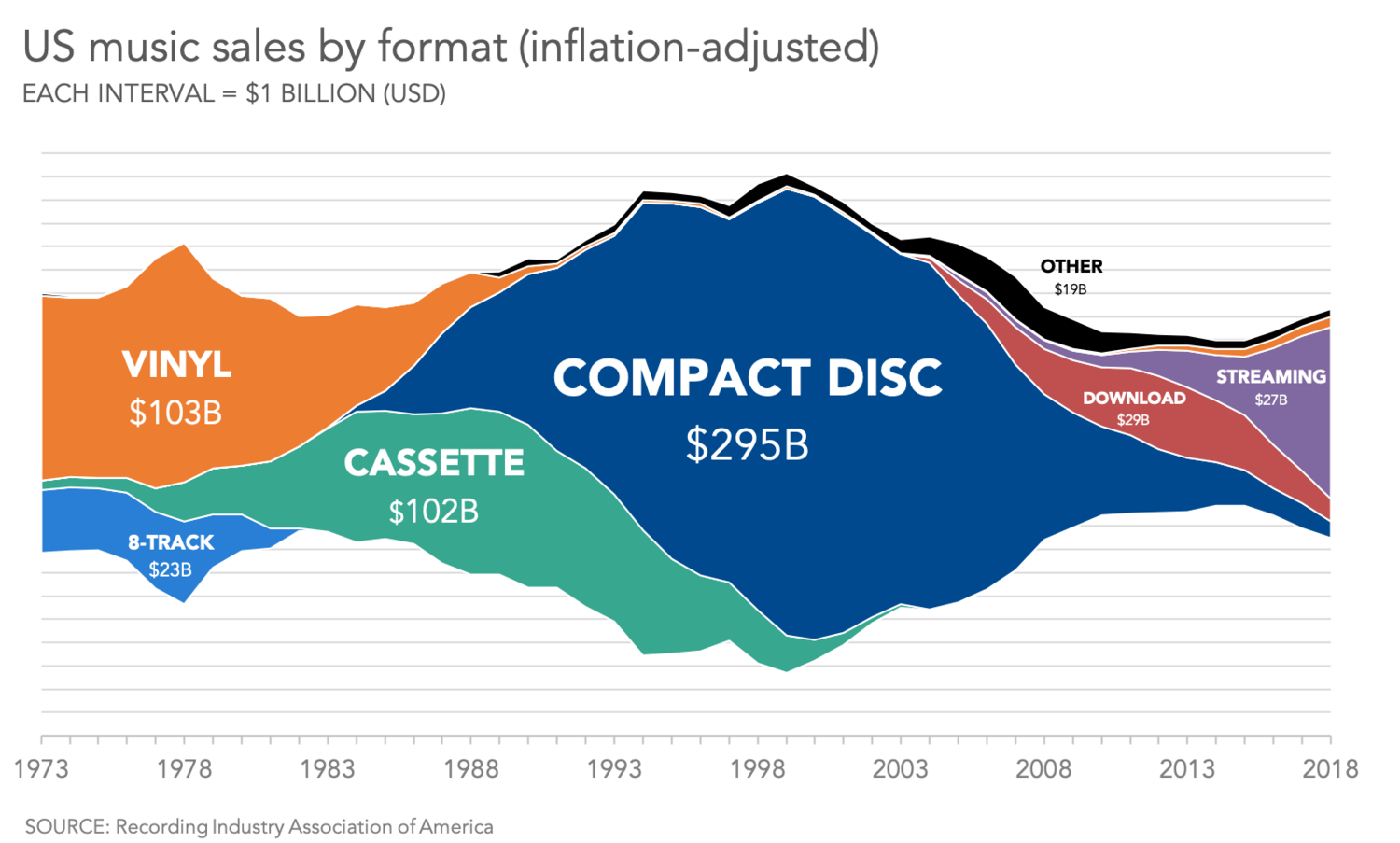
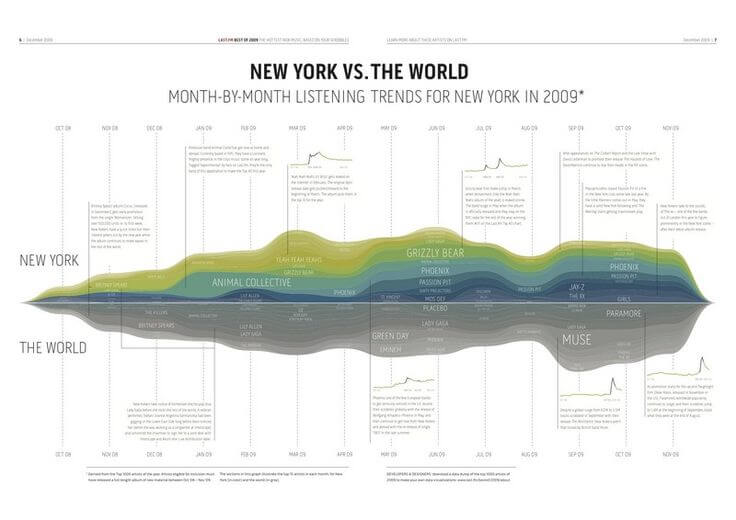
Streamgraphs appear frequently in data journalism, cultural analytics, and creative dashboards where storytelling and pattern recognition are important.

Music Genre Popularity Over Time
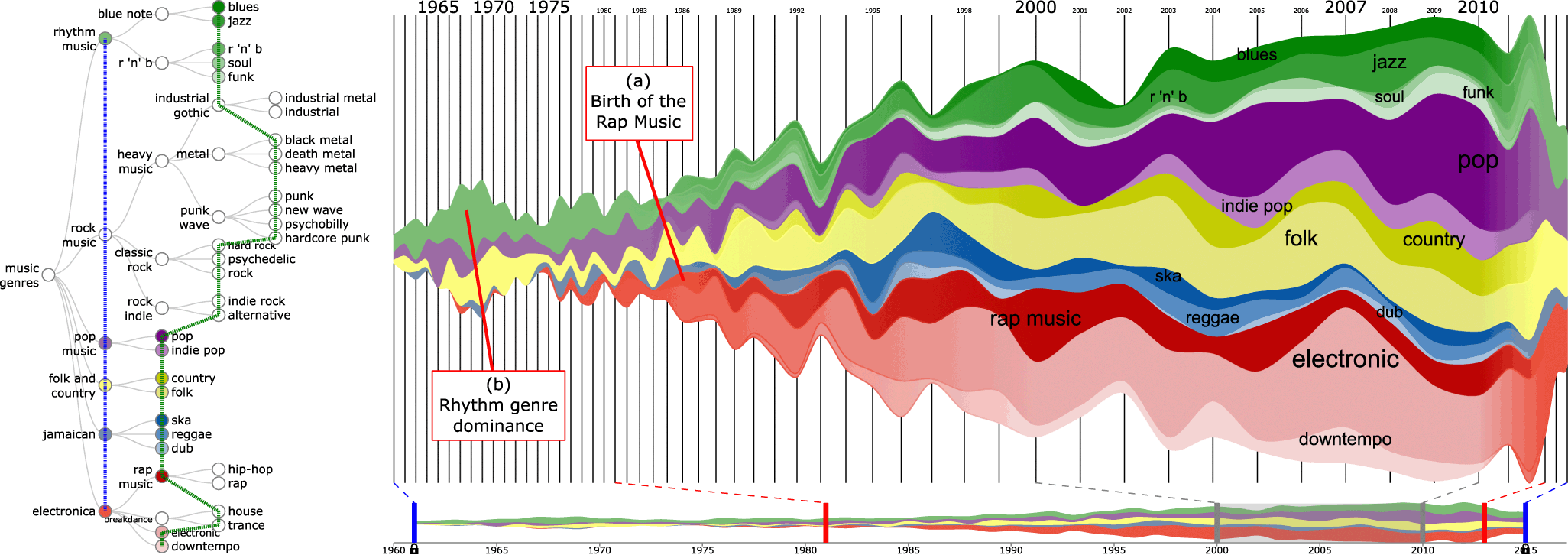
Sample Streamgraph
Sample Streamgraph

Show how different genres rise and fall in popularity across decades.


News or Media Coverage Patterns

Sample Streamgraph

Illustrate how attention to different subjects changes over time.


Website Traffic by Content Category

Sample Streamgraph
Sample Streamgraph

Highlight shifts in audience interest across sections or topics.


Cultural or Linguistic Trends
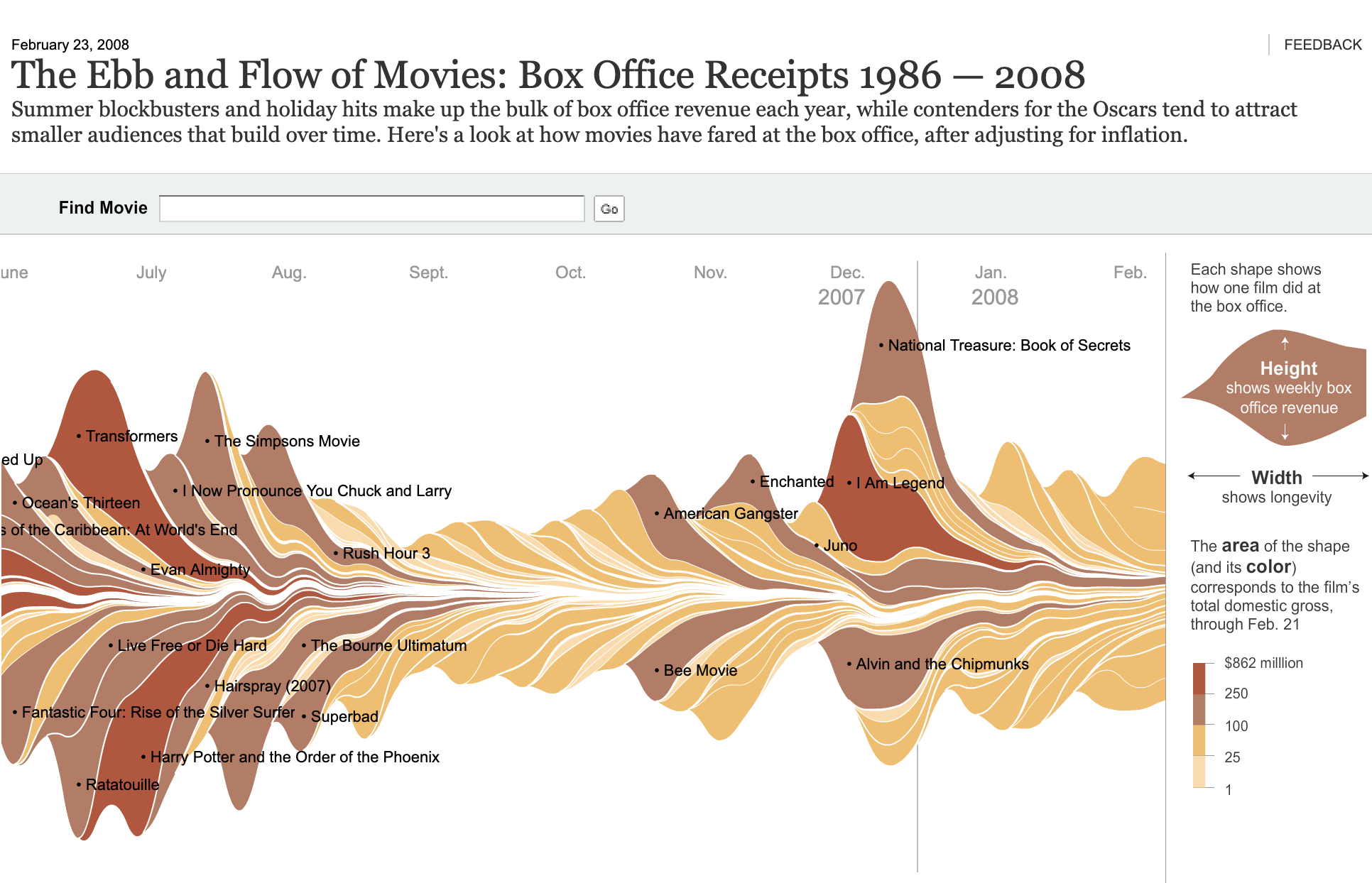
Sample Streamgraph

Show how themes or words fluctuate across long periods.


What to Avoid or Be Careful Of with a Streamgraph

❌ Don’t use it when precise comparison is required
The centered baseline makes it difficult to compare exact values between layers.

❌ Don’t include too many categories
Excessive layers create visual clutter and reduce readability.

❌ Don’t rely solely on color gradients
Clear labeling helps viewers follow individual streams.

❌ Don’t use uneven time intervals
Consistency across the timeline helps maintain visual flow.

❌ Don’t assume audiences are familiar with the format
Brief explanation or annotation can improve interpretation.


*Content on this page was curated and edited by expert humans with the creative assistance of AI.

  • facebook
  • instagram
  • linkedin

DON'T MISS ANY SPOT-ON TIPS!

We don't spam! You'll only get emails when we post something awesome.
You can unsubscribe at any time.

Check your inbox or spam folder to confirm your subscription.

©2025 | The Comm Spot | By Newbold Communication & Design