
Bar Chart: How to Compare Values Across Categories
A bar chart is one of the most familiar—and most powerful—ways to compare values across categories. It’s simple, readable, and incredibly versatile, which is exactly why it shows up everywhere from academic research to dashboards to news graphics.
Instead of asking, “How does this change over time?”
you’re asking, “Which categories are bigger, smaller, or different?”
Related Charts and Graphs
Several visuals relate closely to a bar chart and may be better choices depending on the goal, the structure of the data, or the story being told.
- Grouped bar charts compare multiple subcategories side by side within each main category. Use this variation when several series need to be compared simultaneously without stacking values.
- Stacked bar charts show how parts contribute to a total within each category. This format works well when composition matters, though precise comparison between middle segments can be more difficult.
- Horizontal bar charts rotate the traditional layout, making them easier to read when category labels are long or when many items need to be displayed.
- Lollipop charts provide a lighter visual alternative that reduces visual weight while still allowing comparison through length.
- Dot plots focus on position instead of bar length, helping reduce clutter when categories are numerous.
- Column charts are essentially vertical bar charts and are often used interchangeably depending on terminology and design preference.
- 100% stacked bar charts emphasize proportional relationships rather than absolute values, making them useful when comparing distributions across groups.
What a Bar Chart Is
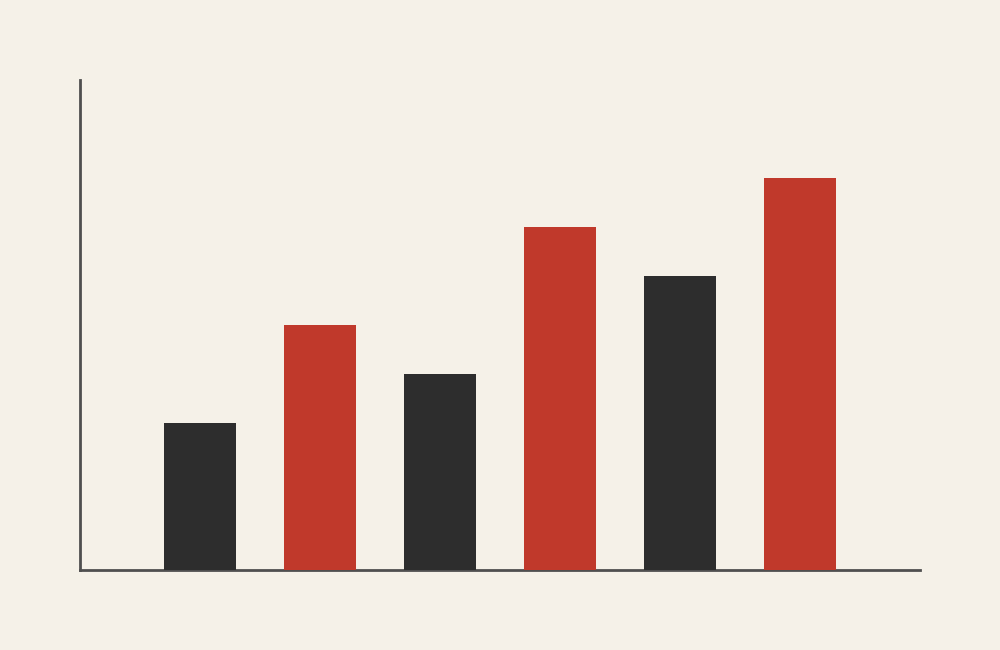
A bar chart displays data using rectangular bars whose lengths represent values. Each bar corresponds to a category, and the bar’s length (or height) shows how much of something that category has.
Bar charts can be:
- Vertical (columns)
- Horizontal (bars)
- Grouped (side-by-side)
- Stacked (with caution)
At its core, a bar chart is about comparison. It makes differences between categories immediately visible.
When to Use a Bar Chart
Use a bar chart when you want to compare discrete categories clearly and directly.
A bar chart works best when you want to:
- Compare quantities across categories
- Rank items from highest to lowest
- Highlight differences between groups
- Show frequency or counts
- Make quick, obvious comparisons
You choose a bar chart when the key question is:
“How do these categories compare to one another?”
Types of Data Sets That Work Best for a Bar Chart
A bar chart works best with categorical data paired with numeric values.
Ideal data sets include:
- Counts or frequencies
- Survey responses summarized by category
- Sales by product or region
- Budget amounts by department
- Performance metrics by group
- Categorical comparisons at a single point in time
Bar charts are especially effective when category labels are meaningful and distinct.
Real-World Examples of a Bar Chart
Bar charts appear everywhere because they’re easy to read and hard to misuse—when used correctly.
Survey Results or Polling Data
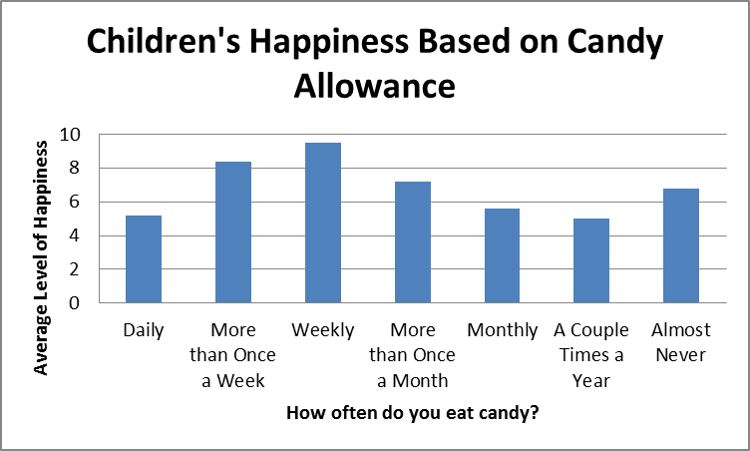
You show how many respondents selected each option, making differences immediately obvious.
Sales, Revenue, or Performance Comparisons
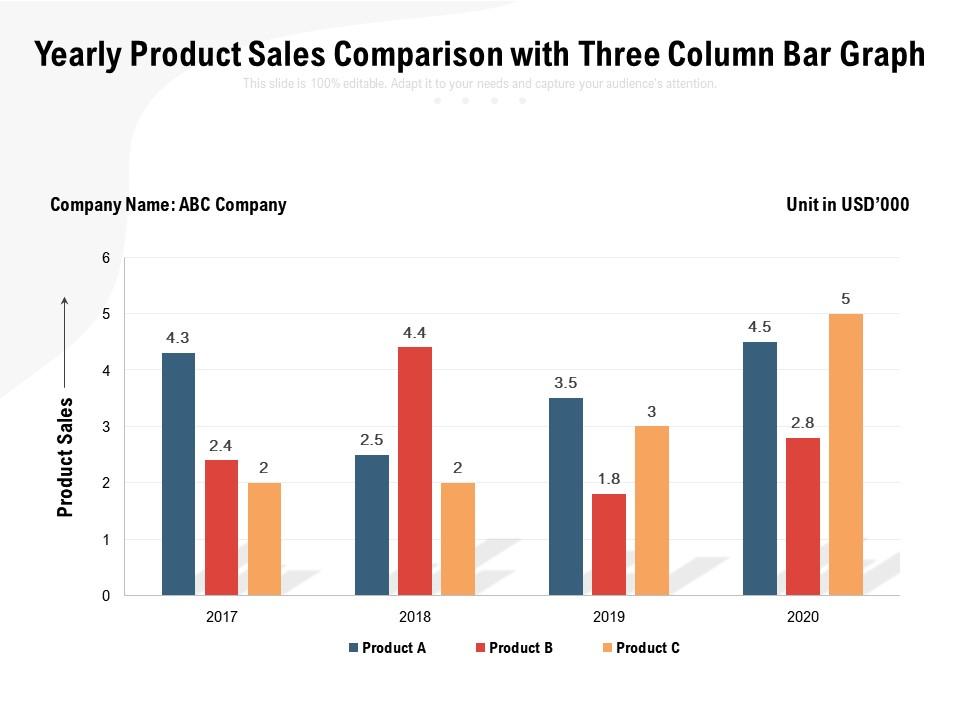

You compare how products, teams, or regions perform relative to one another.
Demographic or Audience Breakdown

You show how a population distributes across categories like age, role, or location.
Rankings and Leaderboards

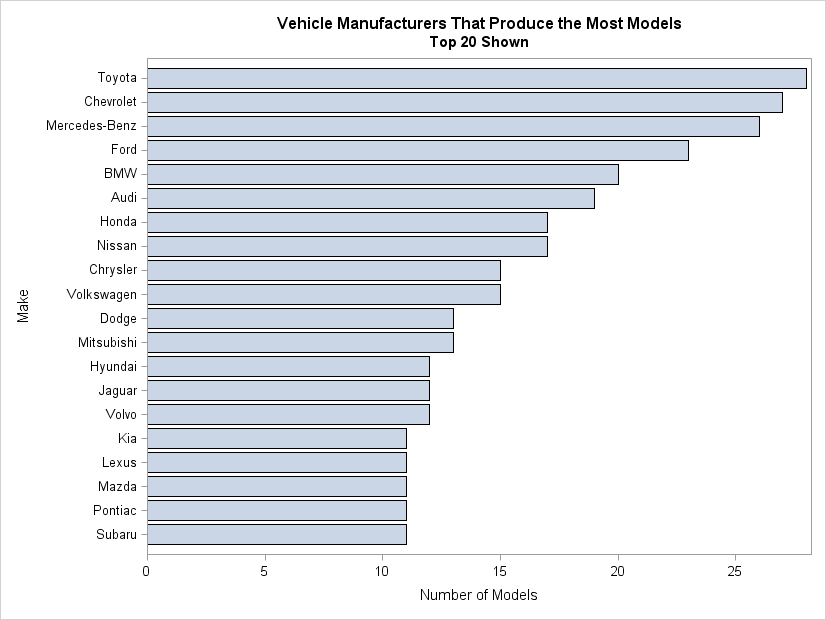
You sort categories to emphasize who’s on top—and who isn’t.
What to Avoid or Be Careful Of with a Bar Chart
❌ Don’t use a bar chart for continuous time trends
If your x-axis is time with many points, a line or area chart will communicate change more clearly.
❌ Don’t truncate the axis
Bar charts rely on a zero baseline. Cutting it off exaggerates differences and misleads viewers.
❌ Don’t overload with categories
Too many bars create clutter. Group or simplify when categories exceed what the eye can comfortably scan.
❌ Don’t stack bars unless necessary
Stacked bars make comparisons difficult unless totals or composition are the primary message.
❌ Don’t ignore sorting
Unsorted bars hide patterns. Ordering bars intentionally often improves clarity and insight.
*Content on this page was curated and edited by expert humans with the creative assistance of AI.