

Skip to content
The Comm Spot The Comm Spot

It's All About Communication

  • HOME
  • ABOUT
    • Meet the Creator: Curtis Newbold, PhD
    • Hire Curtis
    • Publish with Us
    • Contact
    • Privacy Notice
  • COMM-BASICS
    • Glossary
    • Citation & Style Guides
      • AP Style (Journalism)
        • AP Style Overview
        • AP Style Guidelines
        • Media Ethics – SPJ Code of Ethics
        • Elements of Newsworthiness
      • APA Style
        • APA Format – Overview
        • APA - References Guidelines
        • APA - In-text Citations
        • APA - Citing Authors
        • APA - Audiovisual Media
        • APA - Books
        • APA - Digital Sources
        • APA - Events & Interactions
        • APA - Periodicals
        • APA - Print Sources (other than books)
      • Chicago Style
        • Chicago – Overview
        • Chicago - Author-Date System
        • Chicago - Notes-Bibliography System
        • Chicago - In-text Citations
        • Chicago Style - Citing Authors
        • Chicago - Audiovisual Media
        • Chicago - Books
        • Chicago - Digital Sources
        • Chicago - Events and Interactions
        • Chicago - Citing Periodicals
        • Chicago - Print Sources (other than books)
      • MLA Style
        • MLA Overview
        • MLA Works Cited Pages
        • MLA In-text Citations
        • MLA – Authors
        • MLA – Audiovisual Media
        • MLA – Books
        • MLA – Digital Sources
        • MLA – Events & Interactions
        • MLA – Periodicals
        • MLA – Print Sources (other than books)
    • Rhetoric
      • Overview of Rhetoric
      • Rhetorical Appeals (Rhetorical Triangle)
      • Branches of Oratory
      • Canons of Rhetoric
      • Rhetorical Devices
      • Kairos
      • Topos
      • Key Figures in Rhetoric
    • Research Methods
      • Case Studies
      • Competitor Analysis
      • Content Analysis
      • Discourse Analysis
      • Ethnography
      • Focus Groups
      • Observation Research
      • S.W.O.T. Analysis
      • Secondary Research
      • Surveys
      • Target Market Analysis
      • Usability Testing
      • Visual Analysis
    • Theories
    • Thinkers
  • COMM-SUBJECTS
    • Interpersonal Communication
      • Active Listening
      • Body Language
      • Conflict Management
      • Emotional Intelligence
        • Emotional Intelligence Overview
        • Self-Awareness
        • Self-Regulation
        • Motivation
        • Empathy
        • Social Skills
        • Emotional Intelligence Resources
      • Feedback
      • Negotiation
        • Overview of Negotiation
        • Negotiation Skills
        • Negotiation Strategies & Techniques
        • Stages of Negotiation
        • Common Negotiation Scenarios
        • Negotiation Case Studies & Examples
        • Negotiation Tools & Resources
        • Negotiation FAQ
    • Journalism
    • Public Speaking
      • General Guidelines
      • Overcoming Fear
      • Speech Writing and Organization
      • Delivery Techniques
      • Body Language
      • Audience Engagement
      • Storytelling
      • Designing Slides
      • P.O.W.E.R.F.U.L. Presentation Method
    • Strategic Communication
      • Business & Org Comm
        • Definition & History
        • Org Comm Theories
        • Business Documents
        • Change Management
        • Employee Relations
        • Employment Communication
        • Group & Team Communication
        • Leadership Communication
        • Power, Identity, & Ethics at Work
        • Project Management
      • Integrated Marketing Comm
        • Definition of IMC
        • Core Principles of IMC
        • IMC Planning
        • Audience Segmentation
        • Marketing Channels
        • Message Strategies
        • Campaign Measurement & Evaluation
        • Trends & Innovations in IMC
        • Challenges & Pitfalls in IMC
        • Careers & Roles in IMC
      • Public Relations
        • Foundations in PR
        • Strategic Practice
        • Tools & Tactics
        • Research & Analysis
        • Professional Development
      • Case Studies in Strat Comm
    • Technical & Scientific Communication
    • Visual Communication
      • Data Visualization
      • Information Design
      • Photography
      • Web Design
    • Written Communication
      • Writing Process
      • Organizational Methods
        • Five Paragraph Essay
        • Hourglass Method of Writing
        • IMRaD Format (Science)
        • Indirect Method (Bad News)
        • Inverted Pyramid (Journalism)
        • Martini Glass
        • Narrative Format
        • Proposal Format
        • Rogerian Method
        • Toulmin Method
      • Plain Language
        • Audience (Plain Language)
        • Organization (Plain Language)
        • Conversation (Plain Language)
        • Simplicity (Plain Language)
        • Word Choice (Plain Language)
        • Sentence Structure (Plain Language)
        • Design (Plain Language)
      • Punctuation
        • Apostrophes
        • Brackets
        • Colons
        • Commas
        • Ellipses
        • Em Dashes
        • En Dashes
        • Exclamation Marks
        • Hyphens
        • Parentheses
        • Periods
        • Question Marks
        • Quotation Marks
        • Semicolons
      • Style
        • Clarity
        • Conciseness
        • Consistency
        • Editing
        • Flow
        • Rhetorical Devices
        • Sentence Structure
        • Storytelling
        • Tone
        • Voice
        • Word Choice
  • RESOURCES
    • Teaching Resources
      • Assignments & Activities
      • Instructional Design
      • Pedagogies
  • BLOGS
    • The Spotlight Blog
    • Comm Sparks
  • SHOP
    • Cart
    • Checkout
0
The Comm Spot
The Comm Spot

It's All About Communication

Area Graph – Data Visualization

Home >COMM-Subjects >Visual Communication >Data Visualization >Types of Data Visualizations (Charts and Graphs) >Area Graph – Data Visualization

Area Graph: How to Show Change Over Time and Cumulative Trends

An area graph (often called an area chart) is what you use when you want to show change over time while also emphasizing magnitude or accumulation. It’s similar to a line chart—but with weight.

Instead of asking, “What’s the value at this point?”
you’re asking, “How much is happening over time?”


What Are Area Graphs?

An area graph displays quantitative values across a continuous axis—most often time—using a filled area beneath a line. The height of the area represents value, and the filled space reinforces a sense of volume, scale, or total impact.

You can use area graphs in two main ways:

  • Single-series area graphs to show growth or decline
  • Stacked area graphs to show how multiple components contribute to a total over time

If a line chart emphasizes direction, an area graph emphasizes presence and accumulation.


When to Use Area Graphs

Use an area graph when you want to show trends over time and make magnitude feel tangible.

This chart works especially well when you want to:

  • Show growth or decline over time
  • Emphasize total volume or cumulative change
  • Show how parts contribute to a whole across time
  • Compare trends while keeping focus on overall scale
  • Highlight peaks, dips, and long-term patterns

You choose an area graph when the key question is:

“How has this changed over time, and how much is there?”


Types of Data Sets That Work Best

Area graphs work best with continuous, time-based quantitative data.

Strong candidates include:

  • Website traffic over time
  • Sales or revenue by month or quarter
  • Enrollment, population, or usage trends
  • Energy production or consumption over time
  • Budget spending across periods
  • Cumulative counts or totals

Stacked area graphs are especially useful when individual categories collectively form a meaningful total at each time point.


Real-World Examples of Area Graphs

Area graphs are common in dashboards, reports, and storytelling contexts where trends matter just as much as totals.

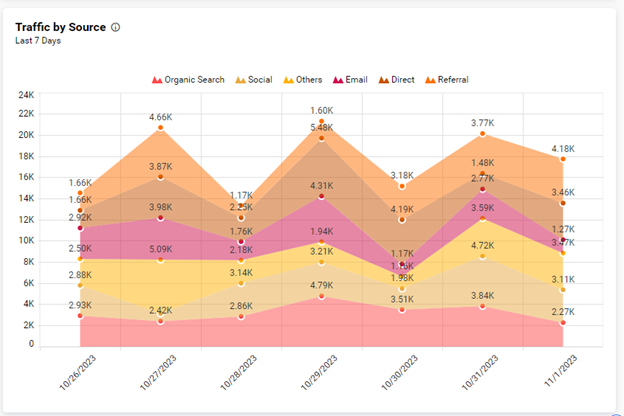
Website Traffic or Engagement Over Time
https://miro.medium.com/v2/resize%3Afit%3A1248/1%2AHVGpvrA7j1ktWI-B7oR6mw.png

You track visits, sessions, or engagement over weeks or months, using the filled area to reinforce scale and growth.


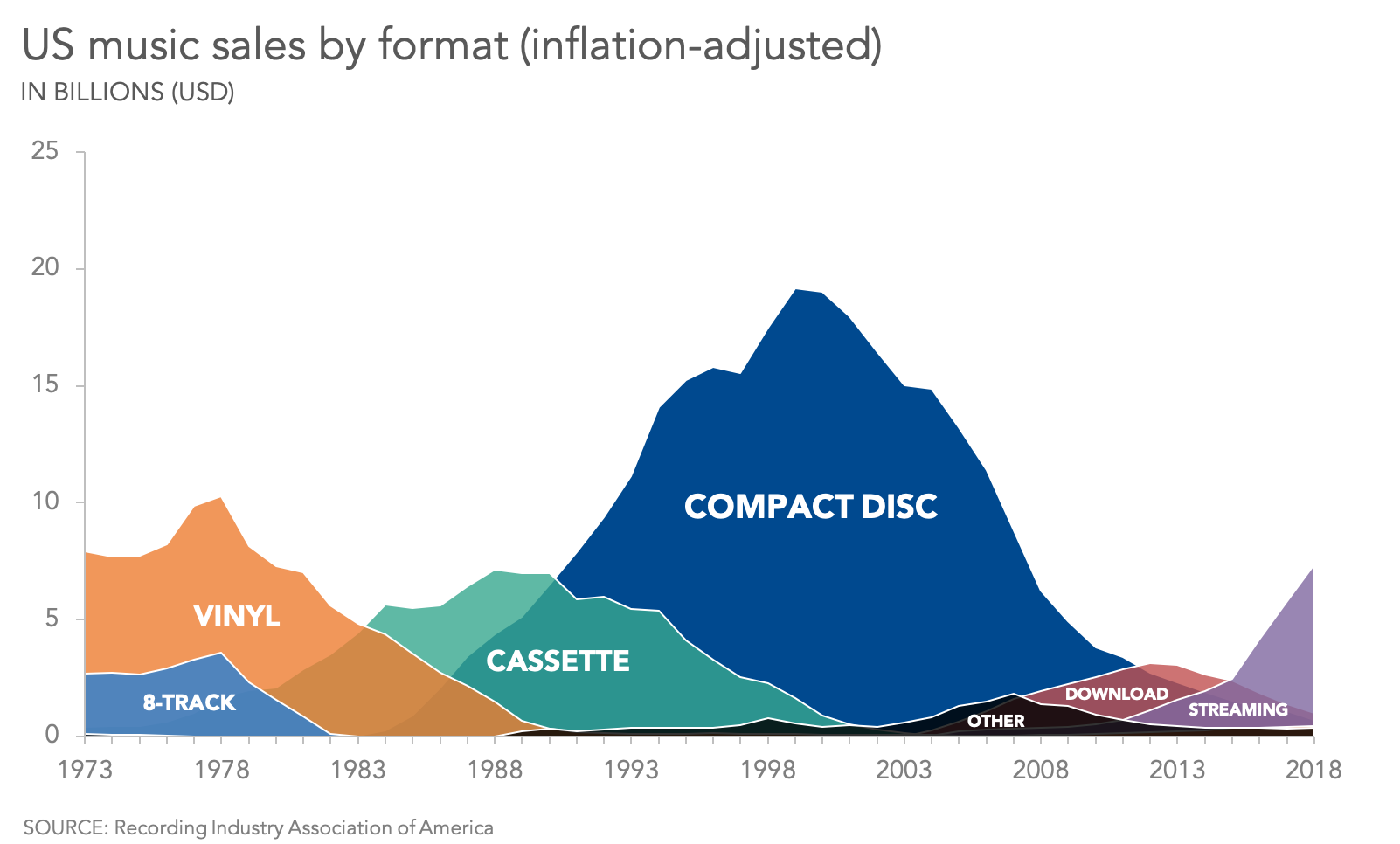
Revenue, Sales, or Financial Trends
https://images.squarespace-cdn.com/content/v1/55b6a6dce4b089e11621d3ed/1586289284165-6Z2M2XKD645EJRCV3TPV/Area%2Bchart%2Bexample.png

You show how revenue grows, dips, or stabilizes—and how different products or regions contribute to the total.


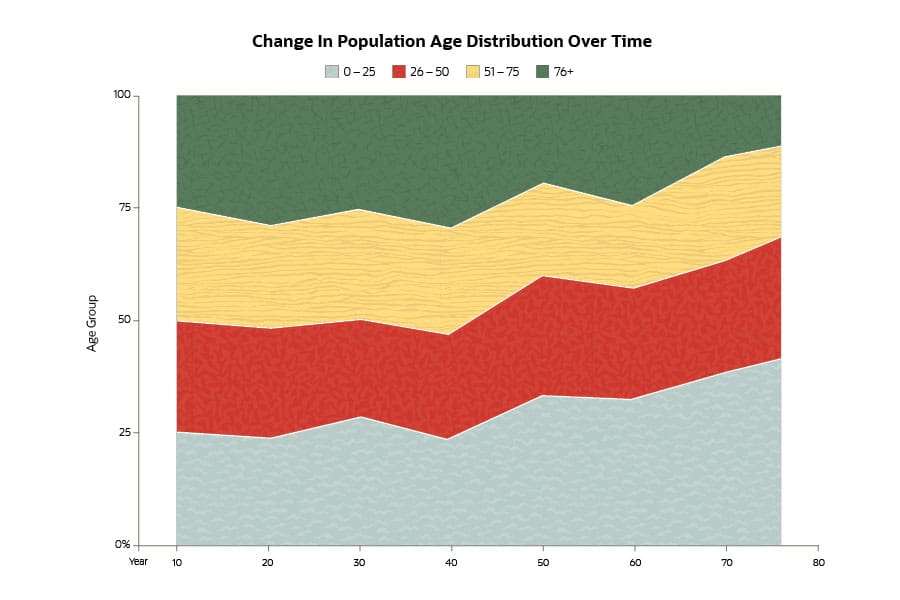
Population or Enrollment Changes
https://www.netsuite.com/portal/assets/img/business-articles/erp/infographic-change-in-population-age-distribution-over-time.jpg
https://nces.ed.gov/nceskids/help/user_guide/graph/images/area.jpg

You visualize long-term growth and shifts in composition, making both change and scale visible at once.


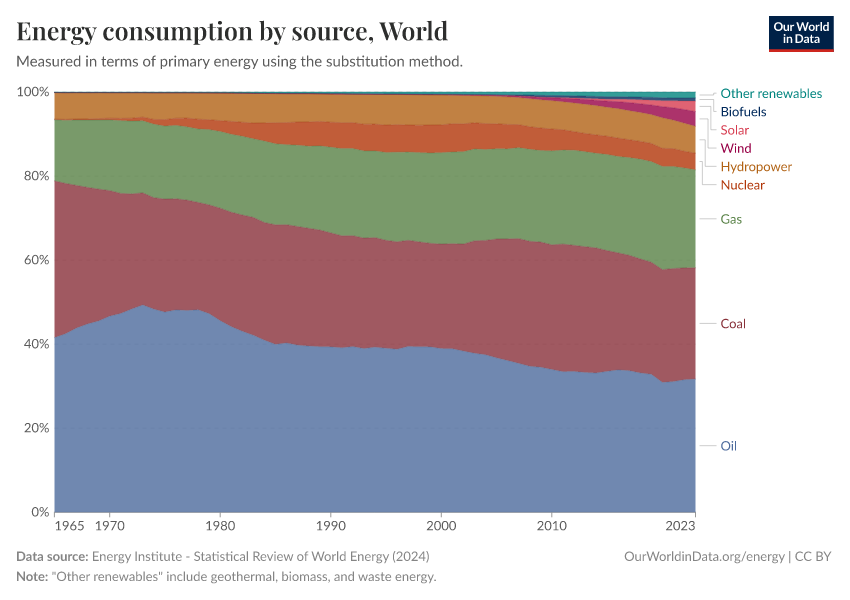
Energy Production or Consumption
https://ourworldindata.org/grapher/energy-consumption-by-source-and-country.png
https://ourworldindata.org/grapher/electricity-prod-source-stacked.png

You show how different sources contribute to total energy usage over time, highlighting transitions and dominance.


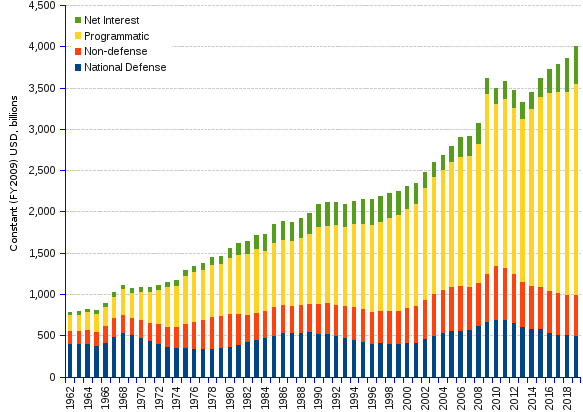
Budget or Resource Use Over Time
https://stats.areppim.com/ressources/us_outlays_62x19_583x412.png

You illustrate how spending accumulates and shifts across categories and years.


What to Avoid or Be Careful Of

❌ Don’t use area graphs when exact comparisons matter
Overlapping areas make precise comparisons difficult, especially between non-adjacent series.

❌ Don’t stack unrelated categories
Stacked area charts imply that categories add up to a meaningful whole. If they don’t, the chart misleads.

❌ Don’t use too many series
Too many layers create visual clutter and obscure patterns. Limit the number of categories.

❌ Don’t ignore baseline issues
Area charts depend on a consistent baseline. Starting axes above zero or shifting baselines can distort perception.

❌ Don’t use area graphs for non-time-based data
Area graphs rely on continuity. If your x-axis is purely categorical with no inherent order, choose a different chart.


*Content on this page was curated and edited by expert humans with the creative assistance of AI.

  • facebook
  • instagram
  • linkedin

DON'T MISS ANY SPOT-ON TIPS!

We don't spam! You'll only get emails when we post something awesome.
You can unsubscribe at any time.

Check your inbox or spam folder to confirm your subscription.

©2025 | The Comm Spot | By Newbold Communication & Design