
How to Write Effective Internal Workplace Newsletters
Internal newsletters are more than just email updates—they’re strategic tools for improving communication, boosting engagement, and reinforcing culture across your organization. When crafted well, newsletters inform, connect, and inspire employees at every level.
1. The Purposes of Internal Newsletters
Internal newsletters keep employees informed, aligned, and engaged. They serve as a centralized communication tool for updates, culture-building, and recognition.
Best Practices:
- Use newsletters to build transparency and trust by sharing leadership updates or business goals.
- Highlight employee accomplishments to boost morale and foster connection.
- Reinforce company culture by featuring values in action, community stories, or DEI initiatives.
- Promote upcoming events, training, or organizational changes in a timely manner.
Examples:
- Share a CEO’s message at the start of each quarter to outline goals.
- Celebrate an employee’s 20-year work anniversary or volunteer service.
- Announce a new product launch with insights from the development team.
2. Preparing to Write Newsletters: Best Practices
Good newsletters begin with planning. You need clear goals, a content calendar, and input from contributors across your organization.
Best Practices:
- Define your newsletter’s purpose—is it informative, motivational, educational, or a mix?
- Identify your audience and tailor the tone and content accordingly (e.g., company-wide vs. departmental).
- Create a content plan for the next few issues to ensure consistency.
- Collect content from departments, teams, or leadership at least one week in advance.
- Set a publishing schedule (e.g., weekly, bi-weekly, monthly) and stick to it.
Examples:
- Develop a rotating contributor schedule where each department submits one item per issue.
- Use a shared content calendar (e.g., in Google Sheets or Asana) to manage ideas and deadlines.
3. Common Uses for Newsletters at Work
Newsletters can serve various functions depending on your organization’s needs—from sharing updates to fostering connection and engagement.
Best Practices:
- Use newsletters to consolidate internal communications in one place.
- Share team wins, project milestones, or customer feedback.
- Highlight training opportunities, wellness resources, or benefits deadlines.
- Promote company events, birthdays, anniversaries, and internal initiatives.
- Include links to important policy updates or company-wide surveys.
Examples:
- A Tech Team Newsletter can highlight recent software upgrades or bug fixes.
- An HR Newsletter might feature wellness tips, benefits info, and DEI spotlights.
- A Leadership Brief can summarize strategic initiatives and KPIs.
4. Typical Components of Internal Newsletters
Strong newsletters have a consistent structure that helps employees know what to expect and where to look.
Components to Include:
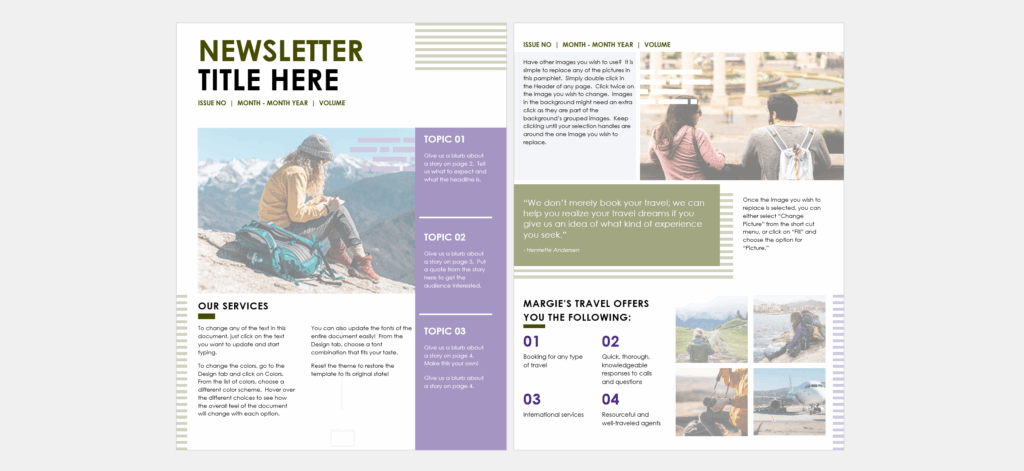
- Newsletter Title
Choose a catchy, relevant name (e.g., The Pulse, InsideTrack, Teamline). - Date or Issue Number
Helps employees track and reference past editions. - Opening Message or Editor’s Note
Use a short note from HR, leadership, or the editor to set the tone. - Headlines and Highlights
Include 2–5 short articles or blurbs—each with its own heading and summary. - Employee Spotlights or Recognitions
Feature someone who went above and beyond, hit a milestone, or contributed uniquely. - Upcoming Events or Dates
Share holidays, birthdays, trainings, or team-building events. - Quick Links or Reminders
Include links to HR systems, surveys, forms, policies, or help centers. - Visuals
Use photos, infographics, icons, or logos to make the layout more engaging. - Call to Action
Ask employees to RSVP, submit feedback, take a training, or nominate a colleague. - Footer/Contact Info
Include who to contact for questions or suggestions, and add a link to your intranet or archive.
5. Two Examples of Successful Newsletters
DN Digest – Designer News
“DN Digest” by Designer News is a visually engaging newsletter that effectively leverages images and color to draw readers in. Its clean design and strategic use of visuals make it easy to scan and find relevant information, enhancing the overall reader experience.

Review – Niice
Niice’s “Review” newsletter stands out for its dynamic content and engaging design. It incorporates various media types, including videos, quotes, and illustrations, to maintain reader interest. The layout is thoughtfully organized, guiding the reader through different sections and encouraging deeper engagement.

6. Writing and Designing Content for Newsletters: Tips, Tricks, and Ideas
Your newsletter content should be skimmable, visual, and relevant. Write with empathy and keep your audience’s attention span in mind.
Best Practices:
- Use conversational, concise language—write like you’re talking to your team.
- Break long text into bullets, headers, or 2–3 sentence paragraphs.
- Use action verbs in headlines (e.g., “Celebrate,” “Join,” “Learn,” “Meet”).
- Write with diversity and inclusion in mind—represent voices from across the organization.
- Include quotes, testimonials, or fun facts to add a human touch.
- Design for visual hierarchy: use bold titles, subheads, and clean formatting.
- Use color and white space wisely—don’t clutter the layout.
- Incorporate recurring segments (e.g., “Wins of the Week,” “Policy Corner,” “Shoutouts”).
Examples of Effective Newsletter Items:
- “5 Things You Missed in Last Month’s All-Hands” – With summary bullets and links.
- “Meet Yolanda, Our New UX Designer” – Featuring a photo and Q&A format.
- “Wellness Tip: Desk Stretches That Actually Help” – Includes link to a short video.
6. Sharing and Archiving Workplace Newsletters
Creating the newsletter is only half the job—you also need a reliable plan to deliver and store them.
Best Practices:
- Distribute via email using a clear subject line (e.g., “InsideTrack | May 2025 Issue”).
- Upload each issue to your company intranet or shared drive.
- Use tools like Mailchimp, Constant Contact, or Microsoft Sway for design and tracking.
- Tag or organize newsletters by category (e.g., department, month, topic).
- Encourage feedback—add a “suggest a story” link or email.
- Track open and click-through rates to gauge effectiveness.
Examples:
- Store past editions in a shared Google Drive folder with read-only access.
- Use your newsletter footer to link to the archive (“See Past Issues”).
*Content on this page was curated and edited by expert humans with the creative assistance of AI.