
Skip to content
The Comm Spot The Comm Spot

It's All About Communication

  • HOME
  • ABOUT
    • Meet the Creator: Curtis Newbold, PhD
    • Hire Curtis
    • Publish with Us
    • Contact
    • Privacy Notice
  • COMM-BASICS
    • Glossary
    • Citation & Style Guides
      • AP Style (Journalism)
        • AP Style Overview
        • AP Style Guidelines
        • Media Ethics – SPJ Code of Ethics
        • Elements of Newsworthiness
      • APA Style
        • APA Format – Overview
        • APA - References Guidelines
        • APA - In-text Citations
        • APA - Citing Authors
        • APA - Audiovisual Media
        • APA - Books
        • APA - Digital Sources
        • APA - Events & Interactions
        • APA - Periodicals
        • APA - Print Sources (other than books)
      • Chicago Style
        • Chicago – Overview
        • Chicago - Author-Date System
        • Chicago - Notes-Bibliography System
        • Chicago - In-text Citations
        • Chicago Style - Citing Authors
        • Chicago - Audiovisual Media
        • Chicago - Books
        • Chicago - Digital Sources
        • Chicago - Events and Interactions
        • Chicago - Citing Periodicals
        • Chicago - Print Sources (other than books)
      • MLA Style
        • MLA Overview
        • MLA Works Cited Pages
        • MLA In-text Citations
        • MLA – Authors
        • MLA – Audiovisual Media
        • MLA – Books
        • MLA – Digital Sources
        • MLA – Events & Interactions
        • MLA – Periodicals
        • MLA – Print Sources (other than books)
    • Rhetoric
      • Overview of Rhetoric
      • Rhetorical Appeals (Rhetorical Triangle)
      • Branches of Oratory
      • Canons of Rhetoric
      • Rhetorical Devices
      • Kairos
      • Topos
      • Key Figures in Rhetoric
    • Research Methods
      • Case Studies
      • Competitor Analysis
      • Content Analysis
      • Discourse Analysis
      • Ethnography
      • Focus Groups
      • Observation Research
      • S.W.O.T. Analysis
      • Secondary Research
      • Surveys
      • Target Market Analysis
      • Usability Testing
      • Visual Analysis
    • Theories
    • Thinkers
  • COMM-SUBJECTS
    • Interpersonal Communication
      • Active Listening
      • Body Language
      • Conflict Management
      • Emotional Intelligence
        • Emotional Intelligence Overview
        • Self-Awareness
        • Self-Regulation
        • Motivation
        • Empathy
        • Social Skills
        • Emotional Intelligence Resources
      • Feedback
      • Negotiation
        • Overview of Negotiation
        • Negotiation Skills
        • Negotiation Strategies & Techniques
        • Stages of Negotiation
        • Common Negotiation Scenarios
        • Negotiation Case Studies & Examples
        • Negotiation Tools & Resources
        • Negotiation FAQ
    • Journalism
    • Public Speaking
      • General Guidelines
      • Overcoming Fear
      • Speech Writing and Organization
      • Delivery Techniques
      • Body Language
      • Audience Engagement
      • Storytelling
      • Designing Slides
      • P.O.W.E.R.F.U.L. Presentation Method
    • Strategic Communication
      • Business & Org Comm
        • Definition & History
        • Org Comm Theories
        • Business Documents
        • Change Management
        • Employee Relations
        • Employment Communication
        • Group & Team Communication
        • Leadership Communication
        • Power, Identity, & Ethics at Work
        • Project Management
      • Integrated Marketing Comm
        • Definition of IMC
        • Core Principles of IMC
        • IMC Planning
        • Audience Segmentation
        • Marketing Channels
        • Message Strategies
        • Campaign Measurement & Evaluation
        • Trends & Innovations in IMC
        • Challenges & Pitfalls in IMC
        • Careers & Roles in IMC
      • Public Relations
        • Foundations in PR
        • Strategic Practice
        • Tools & Tactics
        • Research & Analysis
        • Professional Development
      • Case Studies in Strat Comm
    • Technical & Scientific Communication
    • Visual Communication
      • Data Visualization
      • Information Design
      • Photography
      • Web Design
    • Written Communication
      • Writing Process
      • Organizational Methods
        • Five Paragraph Essay
        • Hourglass Method of Writing
        • IMRaD Format (Science)
        • Indirect Method (Bad News)
        • Inverted Pyramid (Journalism)
        • Martini Glass
        • Narrative Format
        • Proposal Format
        • Rogerian Method
        • Toulmin Method
      • Plain Language
        • Audience (Plain Language)
        • Organization (Plain Language)
        • Conversation (Plain Language)
        • Simplicity (Plain Language)
        • Word Choice (Plain Language)
        • Sentence Structure (Plain Language)
        • Design (Plain Language)
      • Punctuation
        • Apostrophes
        • Brackets
        • Colons
        • Commas
        • Ellipses
        • Em Dashes
        • En Dashes
        • Exclamation Marks
        • Hyphens
        • Parentheses
        • Periods
        • Question Marks
        • Quotation Marks
        • Semicolons
      • Style
        • Clarity
        • Conciseness
        • Consistency
        • Editing
        • Flow
        • Rhetorical Devices
        • Sentence Structure
        • Storytelling
        • Tone
        • Voice
        • Word Choice
  • RESOURCES
    • Teaching Resources
      • Assignments & Activities
      • Instructional Design
      • Pedagogies
  • BLOGS
    • The Spotlight Blog
    • Comm Sparks
  • SHOP
    • Cart
    • Checkout
0
The Comm Spot
The Comm Spot

It's All About Communication

Meeting Agendas (Business Communication)

Home >COMM-Subjects >Strategic Communication >Business & Organizational Communication >Business Documents >Meeting Agendas (Business Communication)

Meeting agendas are more than just schedules—they’re roadmaps that guide discussion, set expectations, and improve productivity. A well-prepared agenda ensures everyone arrives ready to contribute and leaves with clear takeaways.

How to Prepare Effective Meeting Agendas (Best Practices)

Effective agendas help keep meetings focused, collaborative, and on time. They communicate the purpose and plan to everyone involved before the meeting even starts.

Best Practices:

  • Define the purpose of the meeting clearly at the top.
  • Identify specific goals or outcomes you want to achieve.
  • List topics in order of importance or logical flow.
  • Assign time estimates to each agenda item.
  • Include the names of presenters or responsible parties.
  • Share the agenda at least 24 hours in advance (more for complex meetings).
  • Leave room for discussion or follow-up questions.

Avoid:

  • Leaving your agenda vague or overly general.
  • Cramming too many items into a short meeting.
  • Failing to clarify who’s responsible for leading each section.

When to Use Agendas in Meetings

Agendas should be used for any meeting where focus, clarity, and preparation are important—whether you’re gathering a team for five minutes or ninety.

Use an agenda when you:

  • Need to make decisions or assign tasks.
  • Plan to review progress or provide updates.
  • Expect multiple people to present or participate.
  • Want to manage time efficiently and avoid side conversations.

Avoid using formal agendas only when:

  • You’re holding a quick one-on-one check-in.
  • The meeting is spontaneous or exploratory.
  • Your meeting goal is strictly social or team bonding.

Parts of an Agenda

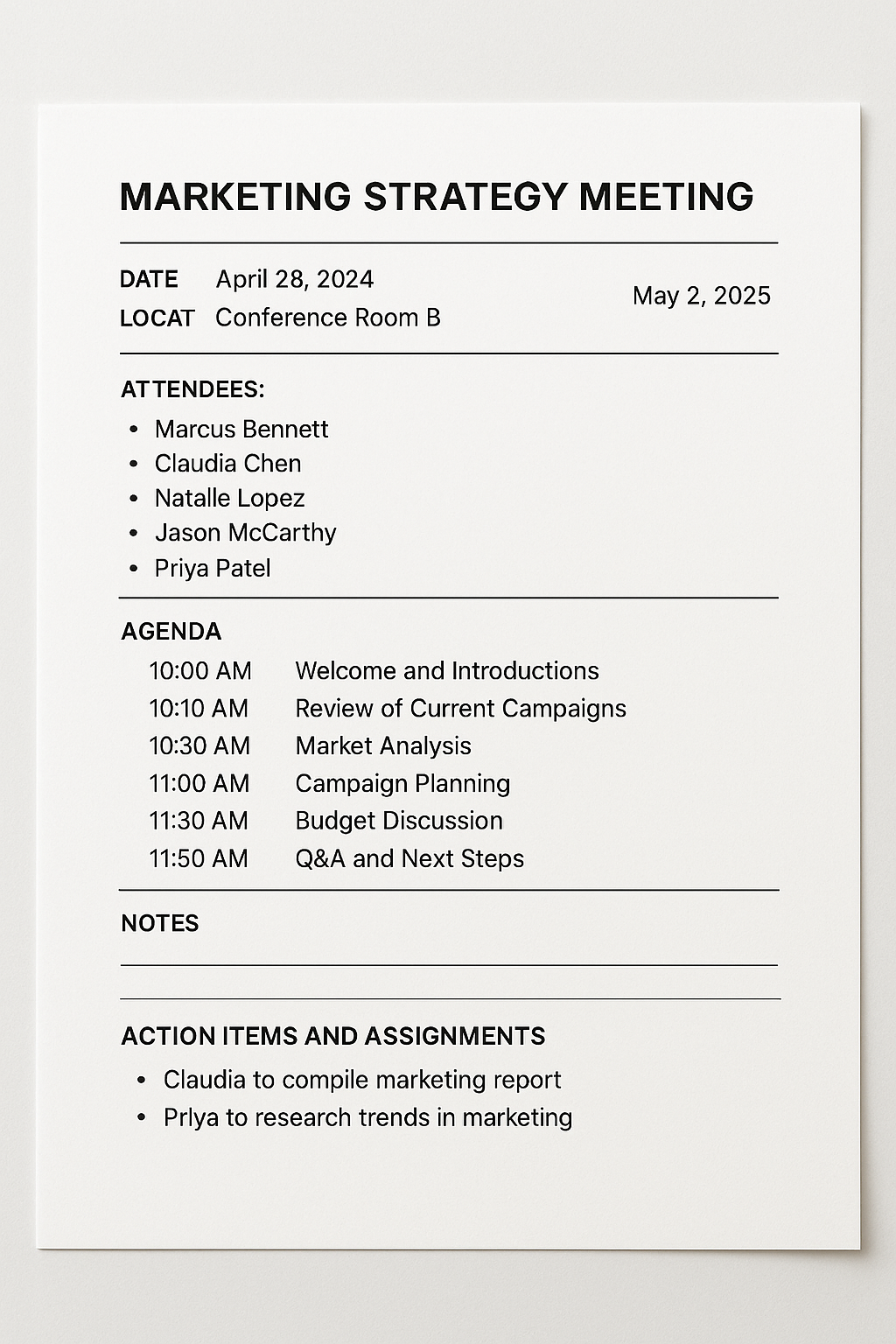
(With Visual Example Available)

Not all agendas need to look the same, but most include a consistent set of components. These elements clarify who, what, when, and why—and they help attendees come prepared and stay engaged.

Common Parts of a Meeting Agenda:

  • Meeting Title: Clearly state what the meeting is about (e.g., “Quarterly Marketing Review”).
  • Date and Time: Specify when the meeting will take place and how long it will last.
  • Location or Link: Include the meeting room or a virtual meeting link.
  • Attendees: List expected participants and any special guests or presenters.
  • Agenda Items / Schedule: Break down the meeting into segments with time allocations.
  • Presenters or Leads: Identify who is leading or presenting each topic.
  • Action Items / Assignments: Leave space to assign follow-up tasks during the meeting.
  • Notes or Comments: Reserve space for writing questions or decisions during the meeting.
Formatting Meeting Agendas

Clear formatting makes an agenda easier to scan, reference, and use during a meeting. A clean structure encourages more organized conversation and helps people follow along.

Best Practices:

  • Use headings, bold text, and spacing to separate sections.
  • Align times on the left and agenda items next to them.
  • Use bullet points for subtopics or talking points.
  • Include a header with date, title, and meeting purpose.
  • Create space for attendees to take notes or record decisions.

Avoid:

  • Using dense paragraphs—make it scannable.
  • Mixing fonts or styles inconsistently.
  • Forgetting to update templates with current info.

Taking Notes

Your agenda also serves as a note-taking tool during the meeting. Capturing what happens ensures accountability and clarity for all attendees—especially for those who miss the meeting.

Best Practices:

  • Leave room below each item to jot down outcomes or key points.
  • Assign one person to act as the official note-taker.
  • Use consistent formatting for action items and deadlines.
  • Send a follow-up summary of decisions and assignments after the meeting.
  • Save agendas and notes in a shared folder for future reference.

Avoid:

  • Taking notes only mentally—important points will be forgotten.
  • Letting everyone take separate notes with no shared record.
  • Skipping the meeting follow-up entirely.

*Content on this page was curated and edited by expert humans with the creative assistance of AI.

  • facebook
  • instagram
  • linkedin

DON'T MISS ANY SPOT-ON TIPS!

We don't spam! You'll only get emails when we post something awesome.
You can unsubscribe at any time.

Check your inbox or spam folder to confirm your subscription.

©2025 | The Comm Spot | By Newbold Communication & Design